
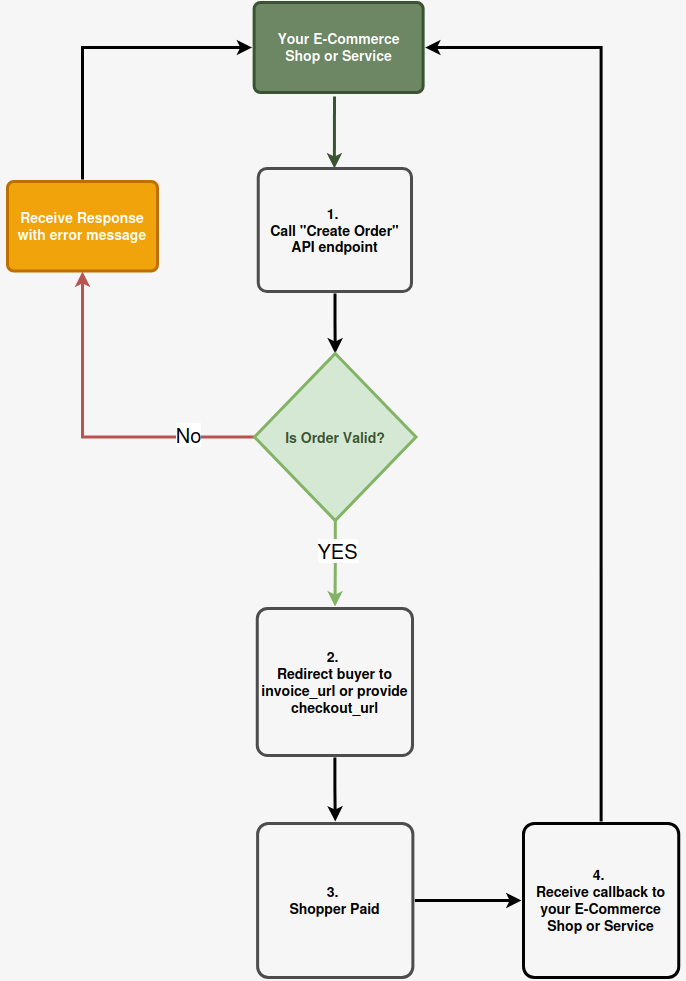
Example Payment Flow
How It Works – Example Flow
- A customer creates an order priced in fiat (e.g. USD or EUR).
- ForgingBlock calculates the payable amount in the selected cryptocurrency using real-time rates.
- The customer completes the on-chain payment.
- Once payment is confirmed, funds are credited to your embedded wallet.
- You can withdraw funds to any external address at any time.
Integration Flow
1. Create an Order
Use the Create Order API to initiate a new payment.
This defines:
- Amount and currency
- Order metadata
- Optional customer and shipping information
2. Redirect the buyer to the URL or share it with them
Successful response
If the order is valid, ForgingBlock returns HTTP 200 OK along with order details, including:
invoice_url
invoice_url- Single-use payment invoice
- Fixed 20-minute lifetime
- Intended for direct checkout flows
- Expires automatically if unpaid
checkout_url
checkout_url- Reusable payment link
- Safe to share via messengers, email, or QR
- Each visit generates a new invoice using the same order data
- Ideal for asynchronous or off-site payments
Action:
Redirect the customer to either URL to complete payment.
Error response
If the order is invalid, the API returns an error describing why the order could not be created.
Customer Completes Payment
The customer:
- Chooses a supported cryptocurrency and network
- Sends the payment on-chain
- Sees confirmation once the transaction is detected
3. Receive Payment Status Updates
ForgingBlock notifies your backend about payment status changes via callbacks (webhooks).
Action:
Handle callbacks to update order state in your system (completed, partially_paid, expired).
API Authentication
All ForgingBlock API requests require authentication.
API Key Authentication
- Authentication is performed using a Bearer API key
- API keys are managed in the Dashboard under:
Account Settings → Integrations → API Token
Request headers
Authorization: Bearer YOUR_API_KEY
Content-Type: application/json- API keys can be rotated or revoked at any time